When my sons want to work on their cars, they don't consult a printed manual. They don't even look up a manual online. They go right to YouTube and find a video tutorial for the model and part they want to fix. They don't take an entire course on all the ins and outs of that vehicle. They are laser-focused on the one task they are trying to accomplish. Now I've been designing "just in time" or "on demand" training for years so it's a pleasure to see non-designers / non-trainers be so successful at it.
What's frustrating, though, is how often you can't see the task in action. Now I'll grant that it's difficult to get the right camera angle or the right light under a car hood. It's especially difficult when there hasn't been any thought in considering the problem. So here are some "most basic of the basic" considerations when you're creating your step-by-step media masterpiece.
You'd think it'd be obvious with photography or videography, that the object of interest should be lit well enough to be seen. In the example of fixing a car, that could be as simple as hanging a shop light from the hood. Video cameras can pick up a lot in low light situations, but the image is immediately improved with some light shed on it.
We were in New Zealand video-recording an interview with a golf pro. Unfortunately, our light kit didn't work well with our transformers for the different electrical system there. Keeping light in mind, we moved the interview outdoors to the porch (away from the sun), where we had a sky full of soft, flattering light shining down on us. Solutions don't have to be complicated. They just have to be thought out.
Believe me, I'm not an audio guy, but when I hear as much air-conditioning rumble as I do narration, I grit my teeth. A little secret is to place the microphone as close to the sound source as possible. Too often, would-be producers settle for a microphone placed across the room. That's excellent for including street noises, air conditioners, and echoing along with your narration.
Mike Rowe, the Dirty Jobs host, is also voice talent for audio books and documentaries. He certainly has the rich voice for them. He has joked about working with a blanket over his head in order to eliminate those extraneous sounds as he narrates.
Point it out or highlight it.
Returning to the car repair example, steps should be taken to isolate the part under repair from the rest of the engine. If possible, a blank card could be placed behind the part to make it stand out. I saw one video where the mechanic pointed at the bolt in question. That was all that was needed.
I'm reminded of going to
Hawai'i Volcanoes National Park. I was tasked with photographing black lava rocks against a black lava background. I took the blandest photos ever of that epic location. I needed a virtual highlighter like they use in NFL videos.
Once I was having problems removing a part from a washing machine. I went to YouTube and found an expert video showing how to change out that part. They showed the part before removing it, then dissolved to the next scene with the part already removed. I suppose they had difficulty removing the part, too. But that was why I was watching the video! Be sure to show whatever it is you're presenting.
Cluttered backgrounds can provide unintended results. Why would you record your host in front of a trash can? Would-be film directors sometimes get so focused on the subject that they just don't see the background. I have to laugh at the network morning news programs that shoot the show in front of a street-level window. Any pedestrian can walk by and make faces or gestures at the camera, and they often do. So a serious news story gets presented with someone in the background mouthing out "Hi, Mom!"
Another distraction is camera motion. The learning audience can accept quite a bit of it in today's videos, but there comes a point when it's disorienting. (The point is where nausea sets in...) There is a lot to be said for setting the camera on a tripod and limiting the number of zoom-ins and zoom-outs for the sake of clarity. Or if you absolutely have to have the hand-held look, hold the camera as steady as possible. Also, please, focus up. Nothing says your subject is unimportant quite like leaving it out of focus.
Again, production values don't have to be complicated or expensive. With a little bit of forethought and planning, they'll increase your production's professionalism. You might just be able to teach something.


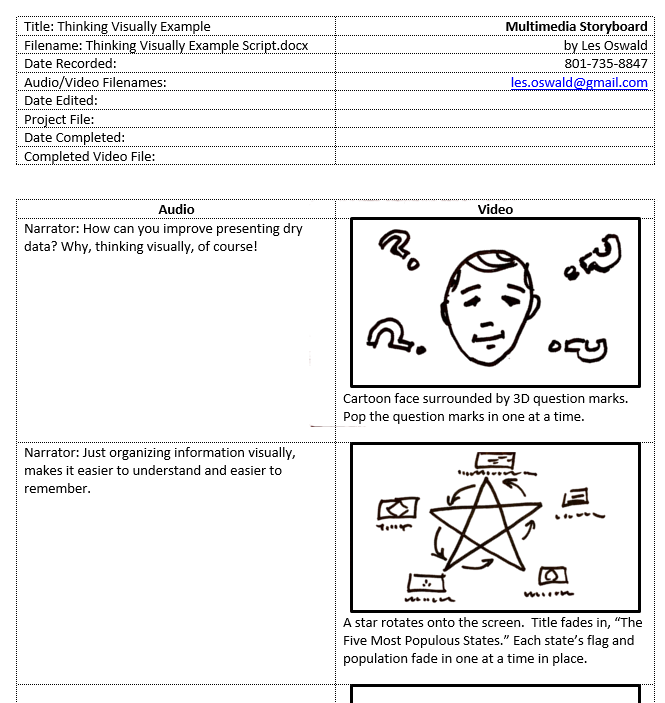 I use a template to write multimedia scripts. It divides the visual and audio sections into separate columns. I noticed that many writers start on the narration portion, and then go back and add the descriptions of the visual side. Since I think visually, I usually start with what I want the audience to see, and then fill in what what needs to be said about each visual. In a “Show and Tell” video they start with the “Tell.” I like to start with the “Show.” Also, I insist that each visual be an instructional hook to hang a concept on. Each graphic has to communicate something.


